Ultrebo for Windows and Mac
Record your mouse clicks and key presses, replay them on a loop, and let your computer react when a button or some text shows up on screen. Built for repetitive game tasks like tower-defense farming.
Windows 10 and 11, and macOS (Apple silicon and Intel). Free, with no accounts, no ads and no tracking. Looking for the phone version? Ultrebo for Android.
What it does
Record
Press F9, play normally, press F9 again. Ultrebo saves each click, drag, scroll and key press with the pauses between them.
Edit every step
Change positions, waits, repeats and order. Test a single step. Switch steps on and off.
Find images
Drag a box over a button or icon on your screen and Ultrebo clicks it whenever it appears.
Find text
Type the words to look for (like "I'm here") and it clicks them when they show up. Text is read on your computer, offline.
Rules
Always-watching detections that check the screen while your macro runs. Pause and carry on, or restart the macro, when a pop-up appears. If two show at once, the one nearest the top goes first.
Share your rules
Export your rules as one file and send it to other players, so they don't have to set everything up themselves.
Discord alerts
Paste a Discord webhook, tick a step or rule, and Ultrebo posts a screenshot to your channel whenever it is found, so you can walk away and still know.
Works inside games
F8 starts and stops, F9 records, even while a game has focus. You can change both keys. Choose which monitor it watches if you have more than one.
Private
Macros and screenshots stay on your computer. Network use is an optional check for a newer version, and a screenshot only if you set up Discord alerts.
A look inside
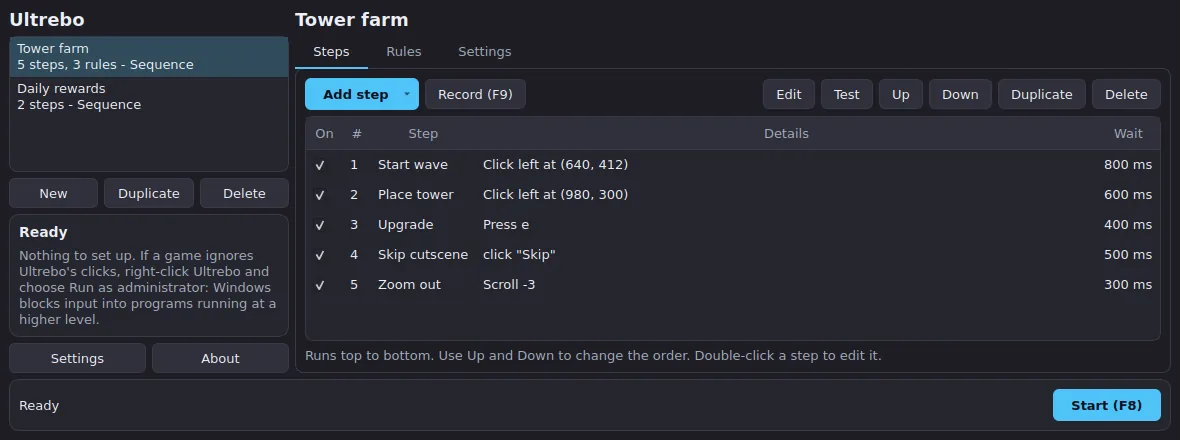
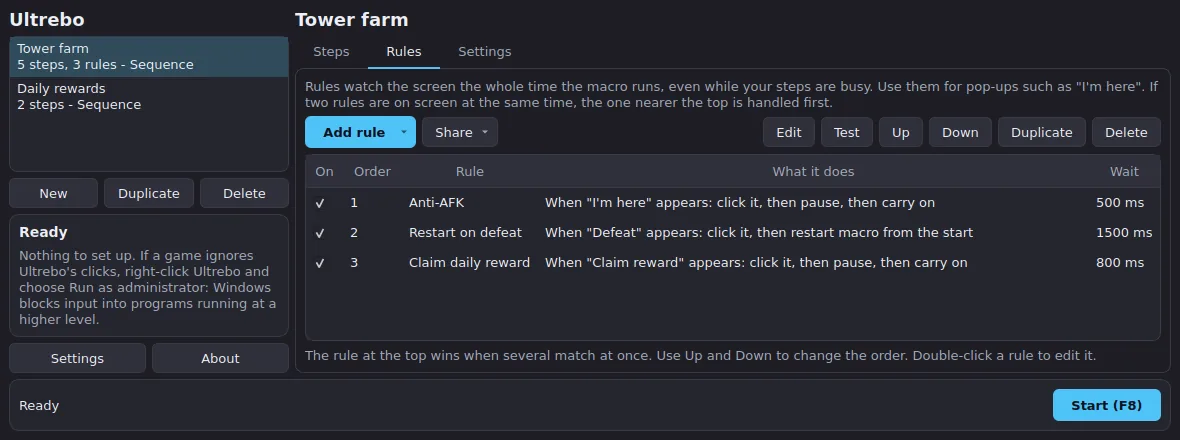
Download and install
There is no installer. Download the zip for your system from the latest release, unzip it, and run Ultrebo.
Windows
- Download
Ultrebo-v….-windows-x64.zipand unzip it anywhere, for example on your Desktop. - Open the
Ultrebofolder and double-clickUltrebo.exe. - If Windows says "Windows protected your PC", click More info, then Run anyway. This appears because the app isn't signed with a paid certificate. Some antivirus programs also flag any program that records the keyboard and mouse. Ultrebo only records while you press Record, and its source code is public.
- If a game ignores the clicks, right-click
Ultrebo.exeand choose Run as administrator.
Mac
- Download
Ultrebo-v….-macos-apple-silicon.zip(M1 and newer) or the Intel one, and unzip it. - Drag Ultrebo into your Applications folder, then right-click it and choose Open the first time. If macOS says it can't verify the app, go to System Settings > Privacy & Security and choose Open Anyway.
- In System Settings > Privacy & Security, switch Ultrebo on under Accessibility (to click and press keys), Input Monitoring (to record, and for the hotkeys) and Screen Recording (only for image and text steps). Ultrebo's Get started card shows what is still missing.
- Quit and reopen Ultrebo after switching the permissions on.
Your first macro
- Click New to make a macro.
- Click Add step > Record inputs (or press F9). The window minimises. Do the clicks and key presses you want in your game, then press F9 again.
- Double-click a step to change it. Use Test to run just that step.
- Press F8 (or Start) to run the macro. Press F8 again to stop. F8 is your safety brake, so check it works before you leave a macro running.
Play in windowed mode, and don't move or resize the game window between recording and running, because clicks are recorded as screen positions.
Updating
When a newer version is out, Ultrebo tells you when it opens. Click Update now and it downloads the new version, checks it against GitHub's published checksum, closes, swaps the new files in and opens again. Your macros and settings are kept. On a Mac you may need to switch the three permissions back on afterwards. Versions before 0.1.1 only show the notice, so download the first update by hand.
Privacy
Everything runs on your computer. Your macros and the pictures you crop are stored in your user folder. Screenshots are looked at in memory and thrown away; the only picture saved is the box you crop. Text recognition is bundled and runs offline. Network use: the optional update check against GitHub, which you can switch off in Settings; downloading the new version if you click Update now; and, only if you set a Discord webhook in Settings and tick the option on a step or rule, a screenshot sent to that webhook when it is found. The webhook address is saved only on your computer and is never part of a shared rules file.
Recording captures every key you press until you stop it, so don't type passwords while recording.
Check it yourself
- The code is public. Read every line on GitHub.
- Built in the open. The downloads are built by GitHub's own build system from that code.
- Scan it. Upload the zip to VirusTotal if you want a second opinion.
Common questions
Clicks land in the wrong place
Don't move or resize the game window after recording. On Windows, keep display scaling the same as when you recorded. Re-record if in doubt.
A game ignores the clicks
On Windows, run Ultrebo as administrator. Some games with anti-cheat block simulated input entirely, and nothing here works around that.
Nothing happens on a Mac
Check that Accessibility and Input Monitoring are switched on for Ultrebo, then quit and reopen it.
An image or some text is never found
Re-pick the image or lower the match threshold (try 0.75). For text, lower the match strictness (try 0.7), or use an image for stylised game fonts.
Does it work on Linux?
There is no packaged Linux build. It can run from source on X11, but not on Wayland, which blocks the kind of input control Ultrebo needs.
Will I get banned?
Many games forbid automation in their terms of service and may suspend accounts that use it. Ultrebo does not hide itself or avoid detection. You are responsible for how you use it.
I'm stuck
Join the Discord server and open a support ticket. Say your operating system and what you did.